Code Verification
In addition to generating the actual embedded QP and MPC algorithms, the toolbox can also generate simple testbenches to help ensure the autogenerated code works as intended. Two autogenerated testbenches are available, one for the QP solver, and one for the MPC algorithm, both optional. Note both require the simulation options as a jSIM object passed to embed in order to generate, as well as an available C compiler for MATLAB.
QP Testbench
Following the first example in Examples/Embedded_Examples.m, the following output is generated:
------------------------------------------------
Auto Generated Embedded Code Verification:
Compiling MEX QP Testbench... Building with 'Microsoft Visual C++ 2019 (C)'.
MEX completed successfully.
Done

Embedded MPC QP Testbench Comparison:
 Successfully Solved [Status 1 vs Ref 1]
Reference   Testbench
6 iter       6 iter
+0.200000    +0.200000
+0.200000    +0.200000
+0.056462    +0.056462

2norm: 0

MEX QP Verification PASSED
- Successfully Solved
- z_norm: 0
------------------------------------------------
Initially - note that the QP testbench is generated by default, and is automatically compiled using the MATLAB MEX interface and executed by the autocode generator. This does mean the autocode generation takes a bit longer, but ensures that the generated QP solver has generated correctly, and functioning as intended.
The testbench source file mexTestQP.c contains a single, hard-coded QP which is the first QP solved by the jMPC toolbox when sim is called on the controller and simulation environment. It also hardcodes the reference solution calculated using the MATLAB/MEX interface, thus allowing automatic verification the autogenerated QP solver has run correctly. The console print out indicates whether the embedded QP solver ran correctly, and prints the embedded and reference solutions for diagnostics.
MPC Testbench
In order to generate the MPC testbench, it must be requested when calling embed:
embeddedopts = jMPCeset('verifympc',1);
embed(MPC1,simopts,embeddedopts)
Following the first example in Examples/Embedded_Examples.m this results in:
------------------------------------------------
Auto Generated Embedded Code Verification:
Compiling MEX QP Testbench... Building with 'Microsoft Visual C++ 2019 (C)'.
MEX completed successfully.
Done
Compiling MEX MPC Testbench... Building with 'Microsoft Visual C++ 2019 (C)'.
MEX completed successfully.
Done

Embedded MPC QP Testbench Comparison:
 Successfully Solved [Status 1 vs Ref 1]
Reference   Testbench
6 iter       6 iter
+0.200000    +0.200000
+0.200000    +0.200000
+0.056462    +0.056462

2norm: 0

MEX QP Verification PASSED
- Successfully Solved
- z_norm: 0

MEX MPC Verification PASSED
- y_norm: 0
- u_norm: 0
------------------------------------------------
As viewable above, in addition to the QP testbench compiling and executing, the MPC testbench has also been automatically compiled and executed. The MPC testbench contains the entire set of simulation data hardcoded into the testbench that would normally be run when sim is called, allowing the testbench to run and provide the controller outputs at each sample. From the console output the key outputs to look at are the bottom norms (y_norm and u_norm) which are the norms of the reference MATLAB/MEX outputs and inputs against the autogenerated embedded MPC controllers outputs and inputs. In this case the embedded implementation is identical to the reference MEX implementation (as expected), and the norms are 0.
In addition to the summary norms, the compare functionality is used to compare the reference vs embedded simulation results and produce a summary plot:
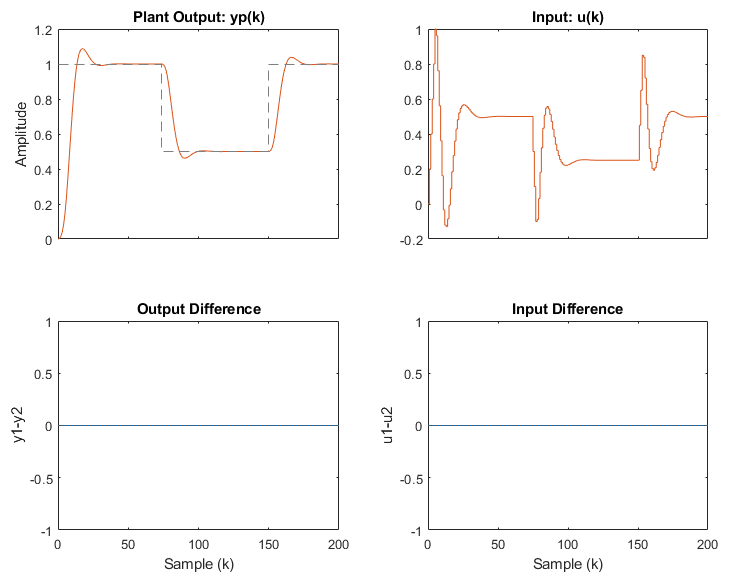
To further give confidence the autogenerated embedded controller is working as intended.
Single Precision Verification
It is generally expected that the embedded MPC controller will be generated in single precision (32 bit floating point) in order to take advantage of the hardware FPU on the embedded target. Therefore the MPC testbench functionality can be exploited to ensure the autocoded single precision implementation is working correctly. Following the above example, but specifying as single precision:
embeddedopts = jMPCeset('verifympc',1,'precision','single');
embed(MPC1,simopts,embeddedopts)
will generate a single precision embedded MPC controller, and compare it against a single precision MATLAB/MEX implementation (this is done automatically). As above, there are no differences (binary equal) with the above run, as they are effectively the same implementation.
An interesting comparison to make is a double precision reference implementation (i.e. designed and run in MATLAB) versus a single precision autocoded embedded implementation. This can be done as follows:
embeddedopts = jMPCeset('tbprecision','double','precision','single','verifympc',1);
embed(MPC1,simopts,embeddedopts)
which, as expected, produces differences near the floating point precision of a single precision number (~1e-7):
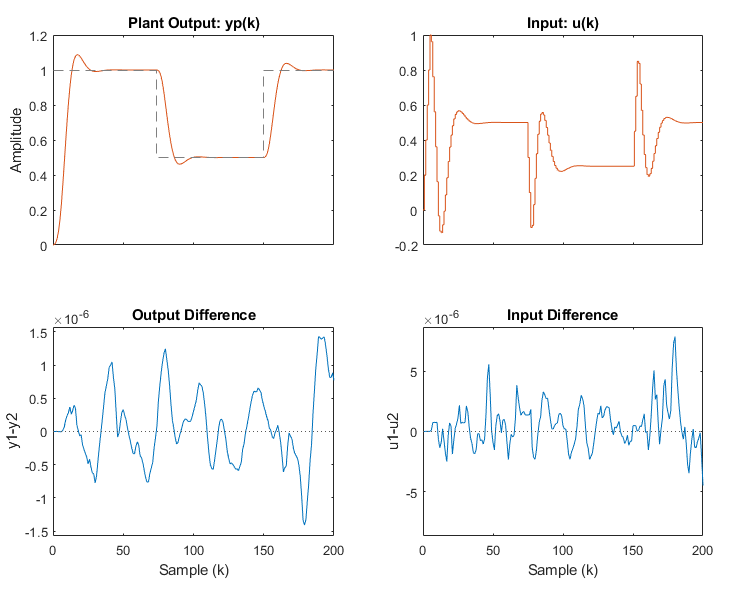
This functionality can be useful to examine problems with poor numerical scaling to ensure the reduced precision controller does not encounter any numerical errors.
The next step is to verify the autocoded controller is working correctly on the embedded target, which is covered in the Processor in the Loop section.